Reload and Hot Reload
Owner does support programmatic reload, as well as the automatic “hot reload” for configuration files.
There are two ways on how the automatic HotReload can be implemented with OWNER: synchronous or asynchronous.
Programmatic reload
Section titled “Programmatic reload”You can manually ask a configuration object to reload. This is done via the Reloadable interface.
Example:
@Sources{...}interface MyConfig extends Reloadable {    String someProperties();}
MyConfig cfg = ConfigFactory.create(MyConfig.class);cfg.reload();
The cfg.reload() will perform the reload of all properties in the same way as
when the object was initially created. If the configuration files have been
altered, after the reload invocation, those changes will be reflected in the
config object.
The Reloadable interface extends from Config:
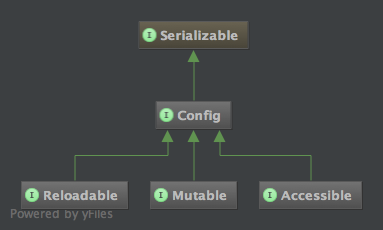
Automatic “hot reload”
Section titled “Automatic “hot reload””You can instruct OWNER to automatically reload the properties files if they are modified on the filesystem.
For instance:
@HotReload@Sources("file:foo/bar/baz.properties")interface MyConfig extends Config { @DefaultValue("localhost") String serverName();}You see in the above example we have specified the annotation @HotReload on
the interface level.
The hot reload works only on filesystem URLs. This means that you can make it work with those two types of URLs:
file:path/to/your.propertiesa filesystem backed URL.jar:file:path/to/some.jar!/path/to/your.propertiesa jar file in your local filesystem that contains a properties files.classpath:path/to/your.propertiesa resource loaded from the classpath, if the classpath resource is stored on filesystem (from inside a jar or from inside a classpath folder). If the ClassLoader is loading the resource from a remote url (for instance from a jar accessed via http protocol), then it won’t work. Almost always, the application loads classes and resources from a filesystem backed classpath. So this should work almost always.
If you don’t specify the @Sources annotation, then OWNER will try to load
the properties file from the classpath from a resource matching the same package and
class name of the mapping interface.
The hot reload annotation instructs OWNER to monitor those resources for changes and reload them when they change.
Why only ‘file:’, ‘jar:file’ and ‘classpath:’ URLs?
Section titled “Why only ‘file:’, ‘jar:file’ and ‘classpath:’ URLs?”Monitoring remote URLs, such as “http” or “ftp”, will involve network communication to download those files from remote servers frequently just for checking if they are changed, and it is not convenient to implement the hot reload doing frequent heavy operations like these. You can still perform the reload programmatically, using the Reloadable interface, for these cases.
While instead, monitoring the filesystem is not a big deal, also because filesystems implement ‘last modification date’ that can be checked to detect modifications without actually check the content of the file for changes.
This is the reason why OWNER implements “hot reload” only on filesystem based URLs.
A source that cannot be watched now says so.
Since 2.0.0. A source that resolves to no file — one inside a jar served over the network, an
http: URL, system:env — is dropped from the watch list, which is the only
thing that can be done with it. Until 2.0.0 it was dropped in silence, and the question that
followed was "I changed the file and nothing happened".
It is now a WARNING naming the sources concerned, once, when the configuration is created.
An absent source stays silent because a fallback chain is built out of absences; this one is different,
because somebody wrote @HotReload and for that source it will never fire. Those sources are
still read at every reload — they are simply never the reason for one.
What is being watched, and how often, is written at CONFIG beside it. See
Debugging for the switch that turns those lines on, and
owner.strict
to have it refused rather than reported.
A reload that fails is a warning and stays one.
Since 2.0.0. When a reload cannot read a source, the configuration keeps the values it already
had and tries again at the next check, saying so once and again only if the failure changes or clears.
owner.strict deliberately does not reach this: a reload happens on a scheduled
thread with nobody to refuse, and turning a transient failure into a crash would be worse than the
warning. A reload that has to be acted on is what the
event API is for.
The @HotReload annotation
Section titled “The @HotReload annotation”The @HotReload annotation accepts 4 optional parameters.
And is defined as:
@interface HotReload {    long value() default 5;    String interval() default "";   // since 2.0.0    TimeUnit unit() default SECONDS;    HotReloadType type() default SYNC;}
enum HotReloadType {    SYNC, ASYNC}
You can check the latest javadocs for further details.
So you can specify also the interval for the hot reload, expressed by value
and unit, and you can also specify the type of hot reload that you need.
Some examples:
// Using the default values:// will check for MyConfig.properties file changes in classpath// with interval of 5 seconds.// It will use SYNC hot reload.@HotReloadinterface MyConfig extends Config { ... }
// Will check for file changes every 2 seconds.// It will use SYNC hot reload.@HotReload(2)@Sources("file:foo/bar/baz.properties")interface MyConfig extends Config { ... }
// Will check for file changes every 500 millis.// It will use SYNC hot reload.@HotReload(value=500, unit = TimeUnit.MILLISECONDS)@Sources("file:foo/bar/baz.properties")interface MyConfig extends Config { ... }
// Will use ASYNC reload type: will span a// separate thread that will check for file// changes every 5 seconds (default)@HotReload(type=HotReloadType.ASYNC)@Sources("file:foo/bar/baz.properties")interface MyConfig extends Config { ... }
// Will use ASYNC reload type and will check every 2 seconds.@HotReload(value=2, type=HotReloadType.ASYNC)@Sources("file:foo/bar/baz.properties")interface MyConfig extends Config { ... }
The difference between SYNC and ASYNC hot reload will be explained below.
An interval decided outside the source file
Section titled “An interval decided outside the source file”value and unit are constants, so the interval they express is fixed when the interface is compiled:
checking every five seconds in development and every five minutes in production meant two interfaces, or
two builds. Since 2.0.0 the interval can be written as text instead, and a ${variable} in it is expanded:
@HotReload(interval = "${owner.reload.interval}", type = HotReloadType.ASYNC)@Sources("file:/etc/myapp/myapp.properties")interface MyConfig extends Config, Reloadable { }ConfigFactory.setProperty("owner.reload.interval", "5m");MyConfig cfg = ConfigFactory.create(MyConfig.class);The variable is looked up in the properties given to the ConfigFactory, in the system properties and in
the environment — the same three sources, in the same order, that expand a
@Sources spec, so -Downer.reload.interval=30s on the command line works
just as well and no code has to change between one deployment and the next.
The value carries its own unit, and unit is not consulted:
| written | means |
|---|---|
500ms |
500 milliseconds |
30s |
30 seconds |
5m |
5 minutes |
2h, 1d |
2 hours, 1 day |
PT1H30M |
ISO-8601: an hour and a half |
A bare number is refused, and on purpose. The duration syntax reads a number with no unit as
milliseconds, while @HotReload(5) — the attribute next door — means five seconds. Two neighbouring
attributes cannot mean different things by the same digits, so interval = "5" is refused with a message
that says to write 5s or 5ms.
Everything that cannot be read is refused when the configuration object is created, not at the first
check that would have used it: a value that is not a duration, a variable nobody set — which arrives at
the parser as the literal ${...} — and an interval that is zero or negative. The message names the
interface, what was written, and what it expanded to when the two differ.
When interval is set it decides, and value is ignored. The two are not merged, because an annotation
attribute cannot be told apart from its default once compiled: a value left out and a value written as
5 look identical from inside. Configurations that do not use interval are untouched.
As explained before the last modified date of the file will be used to detect changes on the files.
Filesystems quirks
The date resolution vary from filesystem to filesystem.
For instance, for Ext3, ReiserFS and HSF+ the date resolution is of 1 second.
For FAT32 the date resolution for the last modified time is 2 seconds.
For Ext4 the date resolution is in nanoseconds.
The synchronous hot reload
Section titled “The synchronous hot reload”The synchronous hot reload works this way: every time you call a method on the
config object created by ConfigFactory.create() the configuration files will
be checked for modifications, then eventually reload the files.
This means that, if you don’t use the config object for long periods there will be no checks on the filesystem, and consequently no reload will be performed.
So, we can define this behavior a lazy hot reload, since it does that only when needed, at the very last time.
This is the default for the @HotReload annotation, but you can also specify
this type of hot reload explicitly with type=SYNC:
@HotReload(type=HotReloadType.SYNC)The asynchronous hot reload
Section titled “The asynchronous hot reload”The asynchronous hot reload works this way: it schedule a periodic task to be executed on a separate thread on the specified interval, to check the files for modification and eventually reload them.
This means that, if you don’t use the config object for long periods, the check on the filesystem will be done in background anyway and eventually the reload will be performed.
To enable this behavior you need to specify type=ASYNC to the hot reload
annotation:
@HotReload(type=HotReloadType.ASYNC)Intercepting reload events
Section titled “Intercepting reload events”Since reload can happen programmatically, and automatically synchronously and asynchronously, it may be helpful for to have some notification mechanism to intercept reload events.
For this, please look at the Reloadable interface, that allows the user to attach ReloadListeners to the config object.
Hot reload example
Section titled “Hot reload example”In the project’s sources it is included a working example:
public class AutoReloadExample {    private static final String spec =      "file:target/test-resources/AutoReloadExample.properties";
    private static File target;
    @Sources(spec)    @HotReload(1)    interface AutoReloadConfig extends Config, Reloadable {        @DefaultValue("5")        Integer someValue();    }
    static {        try {            target = new File(new URL(spec).getFile());        } catch (MalformedURLException e) {            e.printStackTrace();        }    }
    public static void main(String[] args)        throws IOException, InterruptedException {
        save(target, new Properties() { {            setProperty("someValue", "10");        }});
        AutoReloadConfig cfg =            ConfigFactory.create(AutoReloadConfig.class);
        cfg.addReloadListener(new ReloadListener() {            public void reloadPerformed(ReloadEvent event) {                System.out.print(                    "\rReload intercepted at "                    + new Date() + " \n");            }        });
        System.out.println("You can change the file "            + target.getAbsolutePath() +            " and see the changes reflected below");
        int someValue = 0;        while (someValue >= 0) {            someValue = cfg.someValue();            System.out.print(               "\rsomeValue is: " + someValue + "\t\t\t\t");            Thread.sleep(500);        }
    }}
To run this example, you need to follow these steps:
# after downloading the sources in the directory 'owner'$ cd owner$ mvn clean compile test-compile$ java -classpath \ target/classes/:target/test-classes/ \ org.aeonbits.owner.examples.AutoReloadExampleThen you can change the file indicated by the program to see the changes being reflected and the reload event being intercepted.