Accessible, Mutable and Traceable
By default, object created by OWNER are immutable and promote information hiding.
This means that once the Config object is created its properties cannot be modified, and cannot be accessed in any other way than using the methods that are properties mapping methods.
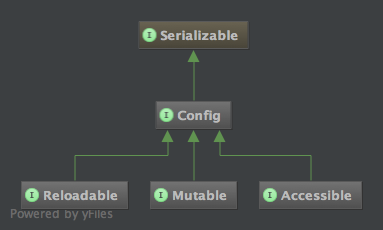
Those limitations are imposed by design, but sometime users may find this problematic. So here they come in the play the interfaces Mutable and Accessible.
This is the hierarchy of the Mutable and Accessible interfaces:
The Mutable interface
Section titled “The Mutable interface”The Mutable interface allows the developer for runtime modifications of the properties contained in the Config object.
Example:
interface MyConfig extends Mutable {    @DefaultValue("18")    public Integer minAge();    public Integer maxAge();}

MyConfig cfg = ConfigFactory.create(MyConfig.class);
// this comes from the @DefaultValueassertEquals(Integer.valueOf(18), cfg.minAge());
// now we change the minAge to 21 using setPropertyString oldValue = cfg.setProperty("minAge", "21");assertEquals("18", oldValue); // the old value was 18assertEquals(Integer.valueOf(21), cfg.minAge()); // now is 21
// now we remove the minAge propertyoldValue = cfg.removeProperty("minAge");assertEquals("21", oldValue); // the old value is 21assertNull(cfg.minAge()); // now is null
In the above example we saw setProperty and removeProperty in action, but the Mutable interface adds even more
methods like clear(), load(InputStream) and load(Reader), and it should allow you to achieve complete write access
to the properties contained inside a Config object.
Generating the file without running the application
Section titled “Generating the file without running the application”Since 2.0.0. The same writer has a command line in front of it, which is the other half of #3 — open since 2013:
$ java -cp app.jar:owner-2.0.0.jar org.aeonbits.owner.TemplateTool com.acme.MyConfig# Everything this application needs in order to start.
# Where the service listens.port = 8080
seconds = 30
$ java -cp app.jar:owner-2.0.0.jar org.aeonbits.owner.TemplateTool --into src/main/resources com.acme.MyConfig com.acme.OtherConfig--into writes <dir>/com/acme/MyConfig.properties, which is exactly where the convention looks for it, so
a directory that is a resources root produces a configuration the library finds with no @Sources at all.
Without it the template goes to standard output, for one interface — two configurations are two files.
Three things are worth knowing about it:
- it does not need
Accessible.save(File)is declared there, so a configuration that does not extend it — most of them, and certainly one that has no file yet — could not write anything at all. The tool has no such requirement: it is the interface’s annotations that are read, not a running configuration; - no source is read. What comes out is what the code says: the
@DefaultValueof each method and the@Descriptionabove it. A tool that loaded the sources would write the machine it ran on into your template — the environment, a password out of a home directory; - run it twice and the second run keeps what you edited in between. It is the writer described above, so your values, your order, your comments and the keys belonging to something else all survive.
Loading an XML document
Section titled “Loading an XML document”Since 2.0.0. loadFromXML(InputStream) reads an XML document into the configuration, and it is not a
delegate to java.util.Properties.loadFromXML: it reads the document the way this library
reads an XML source, so both the Java properties format and an XML of your
own work.
config.loadFromXML(new FileInputStream("server.xml"));<server><http><port>8080</port></http></server>That document is server.http.port=8080 here, and is refused outright by java.util.Properties. It is what
#62 asked for in 2013, and it closes the asymmetry with
storeToXML, which has been on Accessible since 1.0.5 with nothing on this side to read back what it
writes.
Everything else is as load(InputStream): the properties are merged into the ones already held, the
listeners are told, and a transactional listener may refuse the change. The stream is closed when the
method returns, which load(InputStream) does not do to its own — the asymmetry is the JDK’s, where
Properties.load leaves the stream open and Properties.loadFromXML closes it, and it is followed rather
than corrected so that whoever knows that pair knows this one.
The Accessible interface
Section titled “The Accessible interface”As the Mutable interface allows for write access to the properties contained inside a Config object, the Accessible interface allows for read access.
Example:
interface MyConfig extends Accessible {    @DefaultValue("Bohemian Rapsody - Queen")    String favoriteSong();
    @Key("salutation.text")    @DefaultValue("Good Morning")    String salutation();}
MyConfig cfg = ConfigFactory.create(MyConfig.class);assertEquals("Good Morning", cfg.getProperty("salutation.text"));
// print all properties to a PrintWritercfg.list(System.out);
// saves properties to an OutputStreamFile tmp = File.createTempFile("owner-", ".tmp");cfg.store(new FileOutputStream(tmp), "no comments");
As you can see, Accessible is not limited to the getProperty() method, but you can also use this
interface to list() or store() the properties.
Reading a file you have not declared
Section titled “Reading a file you have not declared”A mapping method is a typed, checked way in, and it is worth writing for the values your code depends on.
It is not worth writing three hundred times. A configuration that declares nothing still holds
everything its sources have, and fill hands the lot over in one call:
@Sources("classpath:messages.properties")public interface AppConfig extends Config, Accessible { } // no methods at allMap<String, String> messages = new HashMap<>();ConfigFactory.create(AppConfig.class).fill(messages);That is what #260 was about — a file of three hundred application messages, and an interface nobody wanted to write by hand. From a JSF page, or any expression language, the map is indexed rather than walked, which is also the only way to reach a key that has dots in it:
#{appConfigBean.messages['menu.home']}What fill puts in the map is the value ready to show: the variables are expanded, so a message built out
of another property arrives assembled. getRawProperty still gives the template — see
Which methods process the value.
Though messages are not configuration.
Three hundred pieces of text for the user are i18n, and a
ResourceBundle
is the tool for them — it knows about locales, and JSF reads one with <f:loadBundle>.
Keep this library for the settings, declare the handful of those that matter, and let the messages
live where the framework already looks for them.
Changing a properties file and writing it back
Section titled “Changing a properties file and writing it back”The two interfaces together are the whole round trip, which is the commonest thing people come here
looking for. The configuration is methods rather than fields, so the setter is not on the interface — it
is setProperty, keyed by name:
@Sources("file:/etc/myapp/app.properties")public interface AppConfig extends Mutable, Accessible { String host(); int port();}AppConfig config = ConfigFactory.create(AppConfig.class);config.setProperty("port", "9090"); // or removeProperty("port")
try (OutputStream out = Files.newOutputStream(Paths.get("/etc/myapp/app.properties"))) { config.store(out, "written back by the application");}Everything you did not touch is written back unchanged, and a configuration created afterwards reads the
new value. Pinned down in
WritingTheFileBackTest
against a real file.
This rewrites the file; it does not edit it.
Underneath is
Properties.store,
which serialises a map — so comments, blank lines and the original order do not survive, and a
timestamp line is added. A hand-written file that somebody maintains comes back machine-written:
# the database we talk to        #written back by the application
host = localhost          -->    #Fri Aug 14 17:52:00 CEST 2026
                                 host=localhost
# in milliseconds                port=9090
port = 8080
That is fine for a file only the application writes, and wrong for one a person edits. Saving without destroying the file is #16 and is not implemented; until it is, the honest options are to keep machine-written state in a file of its own, or to edit the text yourself and let OWNER only read it.
Which methods process the value
Section titled “Which methods process the value”A configuration is read in two ways — through the mapping methods, and through the methods of
Accessible — and the two do not do the same amount of work to the value. The rule is that a method
answering with a value processes it, and a method writing the properties out does not, because what
goes out has to be able to come back: a ${...} expanded on the way out is a ${...} lost from the file
at the next save.
expands ${...} |
masks @Sensitive |
applies @EncryptedValue, @ConverterClass, preprocessors |
|
|---|---|---|---|
String url(); — a mapping method |
yes | no, it returns the real value | yes |
getProperty(key), getProperty(key, default) |
yes | no | no |
fill(map) |
yes | no | no |
getRawProperty(key), getRawProperty(key, default) |
no | no | no |
list(out) and toString() |
no | yes | no |
store(out, comments), storeToXML(out, comment) |
no | no | no |
| the JMX attributes | no | no | no |
Only the expansion crosses from one column of methods to the other, and the reason is worth knowing
because it is what makes the table predictable rather than arbitrary: a variable lives in the value, so
it is resolved wherever the value is read; @EncryptedValue, @ConverterClass and the preprocessors are
declared on a method, and a property asked for by name has no method to read the declaration from.
The same sentence settles the key as well. A mapping method also accepts the other spellings of the key
it resolves to — first-name for firstName(), see
How the key may be written — and none of the methods in
the table does: they were handed a key, and they answer about that key. getProperty("firstName") returns
null where the file says first-name, propertyNames() and store() show first-name, and nothing is
ever added under the name of the method.
Which is exactly why an encrypted value is better written in the value.
Since 2.0.0 a value can name what decrypts it —
db.password=${$aes-gcm::…} — and being expansion rather
than a declaration on a method, it is in the first column and not the third: fill() and
getProperty() answer with the secret, and so does a value that refers to it.
store() still writes the marker back, because the properties hold its text rather than its
answer, so the round trip the whole table exists to protect is intact.
//   s     = say//   hello = ${s} HELLO//   b     = ${hello} AGAIN!
cfg.getProperty("b");       // say HELLO AGAIN!   — the value, ready to usecfg.getRawProperty("b");    // ${hello} AGAIN!    — the value, as it was written
This changed in 2.0.0.
Up to 1.0.12 getProperty() and fill() returned the text as it was written,
which meant that the same property answered differently depending on whether it was read through its
method or by name (issue
#319). If you were relying on the old
behaviour — typically to write the properties back to a file — getRawProperty() is that
behaviour under a name that says what it does.
Masking is per key, and that is why a listing is not expanded.
With password masked and jdbc.url=…&password=${password} not, the
listing shows the second line as it was written and the secret does not appear anywhere. Expanding it
would print the masked value in clear inside the line referring to it: the mask is applied to a key,
and a reference goes around it.
Variable expansion can be switched off, for a single method or for the whole interface, with
@DisableFeature(VARIABLE_EXPANSION) — see
Variables expansion. Written on the
interface it reaches getProperty() and fill() as well, and they then behave like the getRaw pair.
Showing only what this interface declares
Section titled “Showing only what this interface declares”One properties file read by several mapping interfaces is an ordinary way to configure an application —
one file to hand out, one interface per module — and it has a consequence nobody asks for: every one of
those configurations holds the whole file. list(), store(), propertyNames() and toString() show
your module’s keys, the other modules’ keys, and whatever was merged in besides — the system properties,
the environment, the imports. Printing a configuration to a log then prints somebody else’s database.
Since 2.0.0 an interface can ask to be shown as itself:
@DeclaredOnly@Sources("classpath:app.properties")public interface AppConfig extends Config, Accessible {    @Key("app.name")    String name();}
config.propertyNames();   // [app.name] — and not db.host, logging.level, PATH, …
The same can be asked of a whole factory, which is how a configuration you did not write — one supplied by a plugin — is restricted without annotating it:
owner.declared.only = trueThe annotation wins over the property in both directions: @DeclaredOnly(false) keeps the whole view
on an interface whose factory asked for the restriction. Like every other factory setting, it is read when
the Config object is created and kept for that object’s life.
What counts as declared is every key of every mapping method of the interface and of the interfaces
it extends, sections included, under the key each of them actually reads. A @Prefix belongs to the
interface that declares the method, so an inherited method keeps the prefix it was declared with.
It restricts what is shown, never what is loaded.
A ${...} is resolved against the other properties, so a configuration that loaded only
its own keys could not expand a variable pointing at a key it does not declare. That is why this is a
view and not a load policy — the reporter of
#150 worked it out for himself while
trying to implement it. For the same reason getProperty(key) is not restricted:
asking for a key by name is a question about the file, and it is the only way left to look at the
properties a variable of yours depends on.
Two kinds of key cannot be part of it, and both for the same reason — there is no key until the method is called:
- one whose key depends on the arguments,
@Key("server.%s.host"); - a section reached through a group whose path the properties decide, an element of a list or a value of a map.
They keep working and they do not appear in the restricted view. It is the rule
@Sensitive and @EncryptedValue already
follow.
A key that holds a variable is shown as it is read
Section titled “A key that holds a variable is shown as it is read”@Key("${myproject.prefix}.debug") is declared like that and read as myproject.debug, the expansion
happening when the method is called. The key as written is where a @DefaultValue is registered, and
where the lookup looks when the expanded key finds nothing — so it is a real entry in the properties, and
it used to be listed as though it were a property of its own:
${myproject.prefix}.debug = false ← nothing can ever read thismyproject.debug = true ← what debug() answers withSince 2.0.0 every view shows the key that is read, and only that one, whether or not the view is
restricted. Where both exist the loaded value wins, exactly as the lookup does. getProperty() answers
under both names, so that a loop over propertyNames() — which is what fill() and the JMX attribute
list are — finds a value for everything the listing named, and code already reading the property by the
key as written keeps working. That is
#230, and the same rule applies to
save(File), where naming the wrong key cost the value rather than the tidiness.
The Traceable interface
Section titled “The Traceable interface”A configuration merged out of several sources answers each property with one
value, and which of the sources that value came from is not something the merged
properties can still say: they are one map, and a value read from a file is
indistinguishable from one that came from the environment or from a
@DefaultValue. Since version 2.0.0 the Traceable interface keeps that
distinction available.
@LoadPolicy(LoadType.MERGE)@Sources({"system:env", "file:config/app.properties"})interface MyConfig extends Config, Traceable {    int port();}
MyConfig cfg = ConfigFactory.create(MyConfig.class);
cfg.originOf("port");                  // file:config/app.propertiescfg.originOf("port").kind();           // Origin.Kind.SOURCEcfg.originOf("nowhere");               // null: there is no such property
An Origin says what kind of place the property came from and, when there is one to name, which source it was:
| Kind | Where the property came from | source() |
|---|---|---|
SOURCE |
one of the @Sources |
the source, as written |
IMPORT |
one of the maps handed to ConfigFactory.create |
import[0], import[1], … |
DEFAULT_VALUE |
a @DefaultValue on the method: nobody wrote it |
null |
RUNTIME |
written afterwards, through Mutable | null |
Under LoadType.MERGE a key may be written in more than one source, and the
origin names the one whose value survived — the first declared. Under
LoadType.FIRST the sources after the one that answered are never read, so
nothing is attributed to them.
The origins follow the properties: a reload() works them out again, so a value
that came back from a file after being overwritten at run time is the file’s
once more; setProperty makes a property one that was written at run time; and
removing a property removes its origin with it.
Saving back only what you own
Section titled “Saving back only what you own”This is what the interface was asked for. With MERGE over system:env and a
file, store() writes the whole environment back into your configuration file
along with the three properties that belong to the application. Knowing where
each key came from is what makes it possible to save only your own:
interface MyConfig extends Config, Accessible, Traceable { ... }
Properties mine = new Properties();for (Map.Entry<String, Origin> entry : cfg.origins().entrySet())    if ("file:config/app.properties".equals(entry.getValue().source()))        mine.setProperty(entry.getKey(), cfg.getRawProperty(entry.getKey()));
mine.store(new FileOutputStream("config/app.properties"), null);
getRawProperty() and not getProperty(), for the reason given in the table
above: this value is on its way back to a file, and saving http://prod-host:80
where the file said http://${host}:${port} would resolve the configuration
once and for all, silently.
origins() hands back a snapshot taken under the same lock as
propertyNames(), so it does not change underneath while a reload runs.
A source never carries its credentials.
A URI may hold them — https://user:secret@config/app.properties is legal and used —
and an origin handed to the caller would be one more place they appear. It is masked exactly as
the log lines and the exception messages are: https://***@config/app.properties.